.png?width=12000&height=2033&name=WeberKnappLogo_white%20(1).png "WeberKnappLogo_white (1)")

Sitting at a desk for eight hours a day can wear on employees. Having the freedom to stand up and change positions throughout the workday can make a difference in how comfortable they feel.For businesses looking to upgrade their office furniture, a sit-stand workstation can be a smart investment in employee comfort. It gives employees the flexibility to switch between sitting and standing throughout the workday, making standing desk ergonomics easier to incorporate into their daily routines.
But purchasing new desks for an entire office isn't as simple as picking one that looks good. The desks need to work for the people using them and fit into the workspace you already have.
Before making that investment, it's worth knowing what to look for in a sit-stand desk and what could cause headaches down the road.
7 Details That Matter When Buying Sit-Stand Workstations
Purchasing sit-stand desks for your office takes some planning, especially when you're outfitting multiple workstations. Beyond the budget, here's what to consider before placing an order.
Assembly
Sit-stand desks can be heavy, and some require two or more people to assemble. If you're purchasing several desks for your office, consider how much time installation will take and who will handle it. Check the manufacturer's assembly instructions before ordering so your team knows what to expect.
Daily Use
Think about how often employees will adjust their sit-stand workstations throughout the workday. A desk that's difficult or time-consuming to adjust could discourage employees from using that feature. Look for a model that allows for smooth adjustments without interrupting their work.
Fit
Read carefully when the desk description outlines the measurements, and make sure the desk will fit your office. If the workstation will have multiple users, it is a good idea to look into the capability for adjustment - and the potential noise levels during that process.
Features
Consider how employees will use their workstations and what features might make their workday more comfortable. A keyboard tray with a mouse platform, for example, can help employees maintain a comfortable position while working. Check which features come standard with the desk and which need to be purchased separately.
Reviews
Before committing to a large order, take some time to read customer reviews. Feedback from other businesses can give you a better idea of how the desks hold up with daily use and if they perform as advertised. Pay attention to recurring complaints that could become bigger problems when purchasing desks for an entire office.
Warranty
Before placing an order, review the manufacturer's warranty to find out what's covered and for how long. Pay particular attention to the motor, frame, and desktop, as coverage may differ between components. It's also a good idea to check the return policy in case a desk arrives damaged or doesn't meet your expectations.
Shipping Timeline
When purchasing desks for an entire office, delivery delays can throw off your plans. Before placing an order, confirm that the desks are in stock and ask about estimated shipping times. If you're coordinating an office renovation or setting up new workstations, knowing when your desks will arrive can help you avoid unnecessary disruptions.

5 Best Practices to Keep Your Standing Desk in the Best Shape
Now that you’ve made the decision to purchase a sit-stand desk, you’ll want to follow these recommendations to get the best return on investment.
- Stay within BIFMA-recommended height ranges
- Purchase for functionality
- Look for versatility
- Always accessorize
- Budget for alternatives
1. Stay within BIFMA-Recommended Height Ranges
The Business + Institutional Furniture Manufacturers Association (BIFMA) conducts rigorous quality tests on furniture intended for businesses and gives its seal of approval through BIFMA-certified furniture.
The recommendation for standing desks is that they’re adjustable from a minimum height of 22 inches to a maximum height of 46.5 inches, according to Work While Walking. This range accommodates 90% of the United States’ population based on the 2010 census -- from the 5th percentile of women to the 95th percentile of men.
In Europe, the EN 527-1 standard specifies an upper height limit approximately 2.7 inches higher than the North American ANSI/BIFMA recommendation.
2. Purchase for Functionality
All a desk needs to be height-adjustable is a sit-stand desk mechanism, which can be either manually operated or electrical. Since each organization has specific needs for those using the desks, verify that the ones you purchase have the right functionality.
For example, some desks have a lift-up table mechanism that moves quickly, which means you can change heights fast. Others have much slower mechanisms (which arguably are a bit safer). For employees who want to be able to adjust the desk quickly, a faster motor is naturally better.
Another functionality concern is weight capacity. Desks need to be strong enough to handle the load on them, lifting and lowering repeatedly without long-term damage. If your desks need to hold multiple computers, don’t skimp on strength.
3. Look for Versatility
Some desks are more feature-rich than others. Many of today’s desks are “smarter” than the old days. Most notably, they can achieve a preset height at the push of a button.
This is a nice feature for a workspace that several people use each day. If an employee comes in and wants a desk height of 50”, they can quickly jump into the system, find the setting, and watch the desk adjust automatically.
4. Always Accessorize
Accessorize? More like necess-orize.
There are at least three types of accessories worth considering if you want to make your employees' workstations more comfortable.
Ergonomic Keyboard Trays
Always think about depth and space when considering office ergonomic accessories.
There are keyboard trays designed specifically for sit-to-stand desks. The most obvious benefit is they can slide out of the way to leave room on the desk, but there are other benefits. They can swivel, move up and down, and adjust in just about any way imaginable to achieve ideal ergonomics for the user.
Many height adjustable tables have crossbars that make up the frame. There are unique keyboard trays out there that are short enough to fit an 8 inch track or an 11 inch track, depending on your needs. This allows the user to fully hide the keyboard tray under the table instead of it sticking out.
Ergonomic Keyboard Trays
Always think about depth and space when considering office ergonomic accessories.
There are keyboard trays designed specifically for sit-to-stand desks. The most obvious benefit is they can slide out of the way to leave room on the desk, but there are other benefits. They can swivel, move up and down, and adjust in just about any way imaginable to achieve ideal ergonomics for the user.
Many height adjustable tables have crossbars that make up the frame. There are unique keyboard trays out there that are short enough to fit an 8 inch track or an 11 inch track, depending on your needs. This allows the user to fully hide the keyboard tray under the table instead of it sticking out.
Monitor Arms
Ergonomic monitor arms allow you to adjust the height and orientation of monitors to help keep the user's eyes, neck, and back in a comfortable position.
An ergonomic monitor arm can hold one or more monitors, depending on the design. These products are fairly uniform; the only other notable difference is whether they’re mounted by clamp or grommet hole.
CPU Holders or Trolleys
A CPU holder attaches to the desk to keep the computer tower out of the way, while a trolley sits on wheels on the floor and can be moved from area to area as necessary. So, which do you want? Consider the following:
- The computer’s size
- How much security you want -- do you want the computer locked in the holder/trolley?
- Is mobility important to the user?
If you prefer stationary CPU stands, make sure the ones you choose have access to the back of the holder. Once you push the computer in, you don’t want to have to climb under your desk to get to the back of the computer. Always choose a CPU holder with a swivel feature so you have access to the cords.
Computer trolleys are usually a little cheaper because they have fewer parts. Despite that, they’re mobile and allow easy access to the back of the computer. In the end, both are a cost-effective option.
5. Budget for Alternatives
Speaking of budget …
Higher quality and more bells and whistles will obviously result in a more expensive desk. But the fundamental benefits of a sit-stand workstation can be obtained on a budget, if you're adamant about not spending to replace all the desks in your office.
There are many devices, like ergonomic monitor lifts and monitor arms, that are great for desks whether they're sit-stand or traditional. Desktop converters with a lift-up mechanism can also sit on top of an existing desk, allowing employees to raise their work surface when standing.
How to Use Sit-Stand Workstations Properly in the Workplace
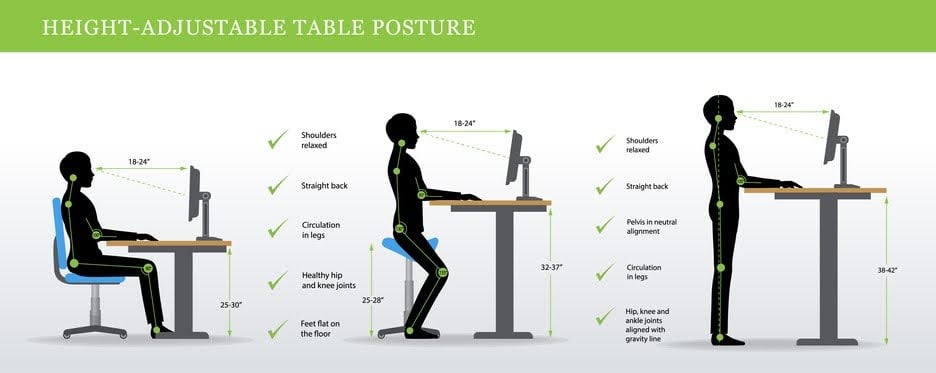
Purchasing sit-stand desks is a good starting point, but how employees use them matters just as much. Following proper standing desk ergonomics can help employees stay comfortable and reduce strain throughout the workday.
Alternate Sitting and Standing
According to Healthline.com, research suggests a sitting-to-standing ratio of 1:1 or 2:1 may be beneficial for comfort and energy levels. That means for every one to two hours spent sitting, employees should aim to spend an hour standing. Try alternating between sitting and standing every 30 to 60 minutes.
Adjust position
This refers to your position at the desk, along with the placement of your keyboard, mouse, and monitor. Make sure you're comfortable while sitting or standing as you focus on your work.
Keep your keyboard and mouse within easy reach and the top of your monitor at eye level. Adj can help employees position their screens comfortably while switching between sitting and standing. The monitor should have an upward tilt of 10 to 20 degrees and sit between 50 and 100 cm from your body.
As for desk height, around 44 inches may be appropriate for someone who is 5'11". The goal is to position the desk at elbow height, allowing your elbows to rest comfortably at a 90-degree angle.
Take Breaks
While standing can help reduce the strain associated with prolonged sitting, it's still a good idea to step away from your workstation throughout the day. Take a short walk, stretch, or give your eyes a break. If needed, consider using an app to set reminders so you don't lose track of time while working.
Use Arm Support
If employees experience wrist pressure while using a mouse, proper support can help improve comfort. Keyboard trays with built-in palm rests can provide additional support, while proper positioning may help reduce strain on the wrists and forearms.
Have a Reliable Standing Surface
It is important to have a floor surface in your office that facilitates standing without putting you at risk of a slip or fall. In addition, there are anti-fatigue mats available that, when combined with your sit-stand desk, optimize blood flow and help with lower back and leg pain.
Make Sit-Stand Workstations Work for Your Office
Investing in sit-stand desks can make the workplace more comfortable. Choosing desks that fit your office and meet employees' needs can also help prevent headaches after installation.
Once the desks are in place, encourage employees to adjust their workstations and change positions throughout the day. With the right approach, a sit-stand workstation can become a natural part of the workday.
Give Your Office Setup a Little More Support
The Manager's Equipment Guide offers practical advice for choosing ergonomic accessories that help employees stay comfortable at their workstations.
This article was originally published in July 2022 and was recently updated to reflect industry trends.
